For Databricks Unity Catalog
Unity Catalog tables, changed like code.
A schema change should be a reviewed, versioned change applied by automation, not a hand edit or a CREATE TABLE buried in a notebook. ucat keeps your Databricks managed table definitions in git as YAML, compares them with what is really in Unity Catalog, shows exactly what would change, and applies it from CI, the same way through dev, test and prod.
Declare. Plan. Apply.
The missing piece next to Declarative Automation Bundles (formerly Databricks Asset Bundles). Describe your tables declaratively, review the plan in a pull request, and apply the same definitions to dev, test and prod, one target at a time.
Declarative Automation Bundlesucat
Who owns the table
In a pipeline, the pipeline owns the table: its schema comes from the query, and the table lives and changes with that code. With ucat the table comes first. Its definition is a file in git that you review like a contract, and the jobs, pipelines and notebooks that fill it are just the ones that write into it.
ucat does not write data into the table and does not check the quality of the data. “Contract” describes the process: a schema change goes through a pull request like any other change. It is not a guarantee about the data. More in Concepts.
Sound familiar?
- A column was added in production by hand. Dev and test never got it.
- Your jobs are full of
CREATE TABLE IF NOT EXISTS. Each pipeline ends up owning its own table definition, so table creation is scattered across the code. It works, but it is a workaround for a missing tool. - Nobody can review a table change before it reaches production.
- A rename quietly became a drop and a create.
Open source under the Apache License 2.0. Issues, contributions welcome, roadmap.Databricks and Unity Catalog are trademarks of Databricks, Inc. ucat is an independent project and is not sponsored or endorsed by Databricks.
How it works
-
Describe tables in YAML
Describe the table you want. One file per table, kept in git next to your code.name: orders schema: silver comment: "Customer orders" columns: - name: id type: BIGINT nullable: false comment: "Primary key" - name: created_at type: TIMESTAMP clustering: columns: [id] -
Plan
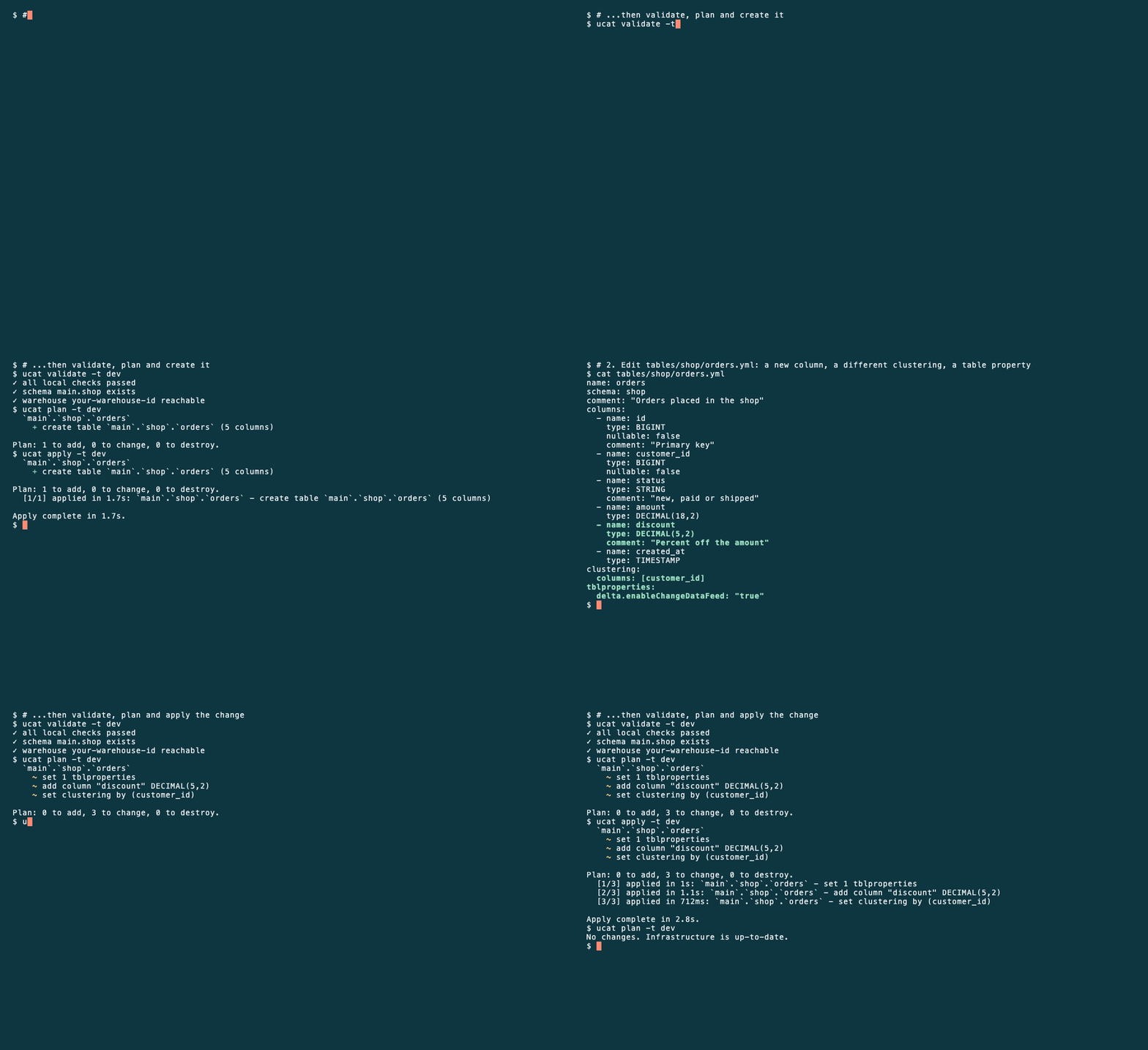
ucat reads the live state from the Unity Catalog REST API and shows exactly what would change. There is no state file to store or lock.$ ucat plan -t dev `main`.`silver`.`orders` + create table `main`.`silver`.`orders` (2 columns) Plan: 1 to add, 0 to change, 0 to destroy. -
Apply
Review, then apply. Destructive changes ask for confirmation; CI uses--auto-approve.ucat apply -t dev -
Change it later
Edit the YAML: add a column, change the clustering, set a table property. Runplanandapplyagain; ucat changes the table in place.- name: discount type: DECIMAL(5,2) clustering: columns: [customer_id] tblproperties: delta.enableChangeDataFeed: "true"$ ucat plan -t dev `main`.`silver`.`orders` ~ set 1 tblproperties ~ add column "discount" DECIMAL(5,2) ~ set clustering by (customer_id) Plan: 0 to add, 3 to change, 0 to destroy.
Key features
Schema changes get the same treatment as code: versioned, reviewed, applied by automation.
Describe it, don't script it
You write the table you want. ucat works out the CREATE and ALTER statements, in the right order. No migrations to hand-write.
columns:
  - name: id
    type: BIGINT
  - name: discount
    type: DECIMAL(5,2)
clustering:
  columns: [customer_id]
Reviewed before it runs
ucat plan shows exactly what would change, with --show-sql for the statements. Put it in a pull request.
$ ucat plan -t dev
  `main`.`shop`.`orders`
    ~ set 1 tblproperties
    ~ add column "discount" DECIMAL(5,2)
    ~ set clustering by (customer_id)

Plan: 0 to add, 3 to change, 0 to destroy.
Safe by default
A rename stays a rename (rename_from), never a drop and a create. A column drop without column mapping is refused at planning time.
rename_from: order_items

$ ucat plan -t dev
  `main`.`shop`.`order_lines`
    ~ rename table order_items → order_lines

Plan: 0 to add, 1 to change, 0 to destroy.
Same definitions, every environment
One YAML, a target per environment. CI applies the same definitions to dev, test and prod, one target at a time. Each target can point to its own workspace.
Built for CI/CD
Exit codes, --detailed-exitcode, --json. One binary for Linux, macOS and Windows.
Start from what you have
ucat pull writes YAML from tables that already exist.
How it compares
ucat does one thing: it keeps the definitions of standalone managed tables in git and brings Unity Catalog to that state. The other tools do other jobs; several of them work well next to ucat.
Hover over or focus a tool to see why it sits where it does.
What you keep besides your filesNothingA history tableA state file and a backend
Left to right: from scripts and migrations you write to a desired state the tool works out. Bottom to top: from one job done in depth to many jobs in one tool.
Our reading of each tool's documentation on 14 November 2026. Positions are approximate: a tool sits in the cell it fits best, and where it stands inside a cell means nothing. Terraform, for example, can also manage individual tables.
| Criterion | ucat | Terraform | Bundles + LakeflowDeclarative Automation Bundles and Lakeflow pipelines | dbt | Atlas | Liquibase | NotebooksCREATE TABLE IF NOT EXISTS |
|---|---|---|---|---|---|---|---|
| Designed for | Definitions of standalone managed tables | Infrastructure as code, including tables, schemas, catalogs | Deploying and running pipelines and jobs; pipeline-owned materialized views and streaming tables | Data transformations; a table is the output of a model | Database schema management, declarative or versioned | Versioned database schema changes, applied as migrations | Running code; creating a table is a side job |
| How you describe a table | Declarative YAML, one file per table | Declarative HCL resource | Pipeline code (SQL or Python) | SQL model plus YAML properties | SQL schema file | Changelog of changesets (SQL, YAML, XML or JSON) | Notebook code (SQL or Python) |
| What you run | One binary | Terraform CLI, provider, state file | Databricks CLI; a pipeline in the workspace | Python, dbt-databricks adapter | Atlas CLI, Atlas Pro account for Databricks | Liquibase and its Databricks extension; needs Java (or a Docker image); a history table in each database | Nothing extra |
| Licence and cost | Open source (Apache 2.0), free | Provider: Apache 2.0. Terraform itself: Business Source License | Part of Databricks | dbt Core open source (Apache 2.0), free | Databricks needs the paid Pro plan | Community: Functional Source License (source available; each release becomes Apache 2.0 after two years). Liquibase Secure: commercial | Part of Databricks |
| Supports managed tables | ● | ● | ○ | ● | |||
| Works out the change and applies it in place (ALTER) | ● | ● | ○ | ||||
| Shows a plan before applying | ● | ○ | ● | ○ |
yes partly (see the note) no. Checked against the vendors' documentation and, for the Terraform provider, its source code (v1.142.0), on 14 November 2026. The Liquibase column was checked against its official documentation on that date.
update does not compare the changelog with the live table.diff-changelog can generate changesets from a comparison of two databases, not of a file with a table.status lists the changesets that are still pending and update-sql shows the SQL they would run. Neither compares the table with a desired state.What ucat adds on top
Explicit renames with rename_from. Checks while planning, before any DDL runs: an unsupported column type change, a new NOT NULL column, a column drop on a table without column mapping. ucat pull, which writes YAML from tables that already exist.
Use together
- Terraform manages catalogs, schemas and grants; ucat manages the tables inside them.
- Bundles deploy your pipelines; ucat manages the standalone tables around them, for example the tables your jobs load data into.
- dbt transforms downstream; ucat keeps the definitions of the tables you load into.
When ucat is not a fit
- You need materialized views or streaming tables owned by a pipeline.
- You need more than managed tables. See the Limitations (the project is actively developing; the Roadmap shows what is next).
What each tool is for, and where ucat fits
Terraform manages infrastructure, tables included, through the Databricks provider. It keeps a state file and runs the SQL on a cluster or a SQL warehouse. The provider documentation itself warns that it "doesn't handle complex cases of schema evolution" and recommends specialised tools such as Liquibase and Flyway, which run versioned migrations. ucat is a specialised tool for Unity Catalog tables that is declarative instead: no state file, a plan with the statements, no Terraform workflow for a schema change.
Liquibase runs versioned migrations: you write each change as a changeset, and every database keeps a history table of what was applied. That is strong for migrations of data, a fixed order of changes and many kinds of databases, and it needs Java (or the Docker image). ucat is declarative: the YAML says what the table should look like, ucat compares it with Unity Catalog and works out the ALTER statements, so a change made by hand shows up in the next plan. There is no history table; git and the plan are the record. ucat is one binary without Java, and the plan with its SQL fits in a pull request. Liquibase can also show pending SQL (update-sql) and compare two databases (diff), but it does not compare a changelog with a live table.
Declarative Automation Bundles deploy pipelines, jobs and other resources, among them catalogs, schemas, volumes and registered models. Tables are not a bundle resource type. Deployments use the direct engine, which keeps its own state file (the Terraform engine was removed in CLI 1.20.0). ucat deploys the standalone tables next to the pipelines that bundles deploy.
Lakeflow pipelines build materialized views and streaming tables. While a pipeline is active, it manages the refresh schedule and permissions of its tables: the table and its pipeline are one unit. This is a different ecosystem from standalone managed tables. If your table is produced by such a pipeline, it is not a job for ucat.
dbt transforms data. A table is the output of a model, so its schema follows the model's SQL, and dbt manages only the tables it builds. ucat is for the tables dbt does not build, for example the tables you load data into, and for keeping their definitions reviewed in git.
Atlas is a schema management tool with a declarative mode and Databricks support. Databricks is available only on its Pro plan or during a trial, and the schema is described in SQL. ucat is open source, uses YAML and is built only for Unity Catalog tables.
Notebooks with CREATE TABLE IF NOT EXISTS are the common baseline, and in our view a workaround for a missing tool. Software engineering settled this long ago: a schema change is a versioned migration applied by automation, kept apart from the code that uses the table, and data teams now keep contracts as code in Git instead of scattering them across jobs. For standalone Unity Catalog tables, nothing in the matrix above did that job. ucat does.
Products change: if something here is out of date, please open an issue. All product names and trademarks are the property of their respective owners.
Quickstart
From install to the first plan in about five minutes.
-
Install
With Homebrew on macOS or Linux, or download a binary from GitHub Releases (Linux, macOS, Windows). Go 1.26 or newer can build it from source.brew install ninilich/ucat/ucat ucat version -
Authenticate
Log in the usual Databricks way. ucat uses the workspace host of the target and the login you made for that host.databricks auth login --host https://<workspace>.cloud.databricks.com -
Create a project
ucat init -
See what would change
ucat plan -t dev -
Apply
ucat apply -t dev
Already have tables in Unity Catalog? Import them: ucat pull -t dev writes the YAML for you.
Want to try it on a ready project? The quickstart example creates a small shop schema, changes it twice and cleans up.